datatree-templates
Template Engine based on DataTree API
A small, fast server-side template engine that renders HTML, XHTML, XML, and plain text
from hierarchical data. It is Mustache-like in spirit, but it reads its data directly from
datatree Tree objects (or plain Maps) and keeps its directive set deliberately simple —
which is exactly what makes it quick. Each template is compiled once into an in-memory
fragment tree, cached, and then rendered repeatedly against different data.
Performance
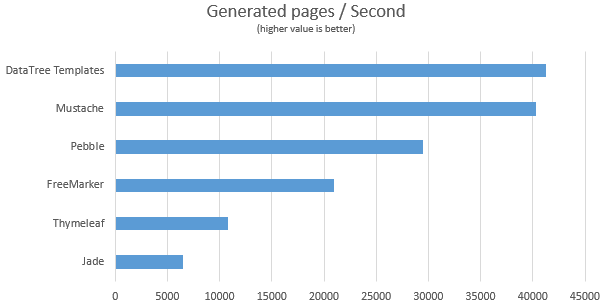
The compile-once design makes it consistently faster than most general-purpose engines. The
chart below compares it against FreeMarker, Mustache, Thymeleaf, and Pebble (see
PerformanceTest):
Features
- Sub-templates — include shared headers, footers, and fragments.
- Variable insertion with JSON-path — reach nested values like
user.address[2].city. - Loops — iterate over arrays/lists to build tables and lists (nestable).
- Conditionals — render a block when a value exists / is missing, or equals / differs from a given value.
- Output-safe — values are XML/HTML-escaped by default; escaping can be disabled for plain-text output.
- User-defined functions — register Java callbacks for custom formatting and rendering.
- Pluggable loading & caching — load templates from the classpath, the filesystem, or your own source; cache them and optionally hot-reload during development.
Limitations
By design, the engine is intentionally minimal:
- The data model must be collections of primitives and Strings (
Tree,Map,List, object arrays) — not POJOs. POJO content can only be inserted through user-defined functions. - There is no built-in internationalization (i18n).
- The syntax is not a full expression language; only the simple conditions below are available. Complex logic belongs in your Java code, not in the template.
Download
<dependency>
    <groupId>com.github.berkesa</groupId>
    <artifactId>datatree-templates</artifactId>
    <version>2.2.0</version>
</dependency>
This pulls in datatree-core (the Tree type) transitively.
Usage
Defining a template inline
The quickest way to try the engine — register a template from a string and render it:
TemplateEngine engine = new TemplateEngine();
engine.define("page.html", "Hello #{name}!");

Tree data = new Tree();
data.put("name", "Tom");

String out = engine.process("page.html", data);   // "Hello Tom!"
Loading templates from a directory
In real applications you load templates from the classpath or filesystem. Set a root
directory and render by path. The data model can be a Tree or a plain Map:
TemplateEngine engine = new TemplateEngine();
engine.setRootDirectory("/www");           // prefixed to every template path
engine.setReloadTemplates(false);          // false in production (templates are cached)
engine.setCharset(StandardCharsets.UTF_8);

Map<String, Object> data = new HashMap<>();
data.put("title", "Welcome");

String html = engine.process("index.html", data);
A single TemplateEngine is thread-safe and is meant to be shared across threads. Set
setReloadTemplates(true) during development so edited template files are recompiled
automatically; keep it false in production for maximum speed.
Custom resource loader
By default templates are read from the filesystem first, then from the classpath. To load
them from somewhere else — a database, an embedded resource bundle, etc. — implement
io.datatree.templates.ResourceLoader:
engine.setLoader(new MyDatabaseLoader());
Template pre-processor
A pre-processor runs once per template, right after it is loaded (so with caching on, the cost is paid only once). A typical use is minifying HTML. A ready-made minifier ships with the engine:
engine.setTemplatePreProcessor(new SimpleHtmlMinifier());
Any Function<String, String> works, so you can plug in your own pre-processor (or a
third-party HTML compressor) just as easily.
Custom functions
Register a Java callback and invoke it from a template with #{fn name var}. The callback
receives a StringBuilder to append output to, and the Tree node passed as its argument:
engine.addFunction("currency", (out, node) -> {
    if (node == null) {
        return;
    }
    double value = node.asDouble();
    out.append(DecimalFormat.getCurrencyInstance().format(value));
});
Total: #{fn currency price}
Unknown function names are reported at compile time, not silently ignored.
Template syntax
All directives use the #{ ... } delimiter. Block directives are closed with #{end}.
| Directive | Short form | Purpose |
|---|---|---|
#{var} |
— | Insert a value (supports JSON-path, e.g. user.address.city) |
#{include path} |
#{in path} |
Insert a sub-template |
#{for item : list} … #{end} |
— | Loop over an array/list (the : is optional) |
#{exists v} … #{end} |
#{ex v} |
Render the block if the value exists |
#{!exists v} … #{end} |
#{!ex v} |
Render the block if the value is missing |
#{equals v x} … #{end} |
#{eq v x} |
Render the block if the value equals x |
#{!equals v x} … #{end} |
#{!eq v x} |
Render the block if the value differs from x |
#{function name v} |
#{fn name v} |
Invoke a user-defined function (argument optional) |
#{end} |
— | Close a for / exists / equals block |
Variable insertion (with nested JSON-path):
<p>Name: #{name}</p>
<p>City: #{user.address.city}</p>
<p>First tag: #{tags[0]}</p>
Sub-templates:
#{include ../parts/header.html}
... page body ...
#{in parts/footer.txt}
Loops (nestable; the colon is optional):
<ul>
#{for item : items}
    <li>#{item.name} — #{item.price}</li>
#{end}
</ul>
Existence checks:
#{exists email}
    Contact: #{email}
#{end}
#{!exists email}
    No email address provided.
#{end}
Equality checks:
#{eq role admin}
    Welcome, administrator.
#{end}
#{!eq status active}
    Your account is not active.
#{end}
Escaping. Inserted values are XML/HTML-escaped by default (so < & > becomes
< & >), which is what you want for HTML output. Static template text is never
touched. For plain-text output where you don’t want escaping, turn it off:
engine.setEscapeSpecialCharacters(false);
A complete example
Build a data tree, register a custom currency function, and render a template that uses an
include, variables, conditionals, a loop, and the function.
template.html (on the classpath, under the configured root directory):
<html>
    <body>
        #{include header.html}
        <p>A: #{a}</p>
        <p>B: #{b}</p>
        #{!eq a 2}
            <p>C: #{c}</p>
        #{end}
        #{eq a 1}
            <p>E: #{d.e}</p>
        #{end}
        Price: #{fn currency price}
        <table>
            #{for row : table}
                #{!eq row.second false}
                    <tr>
                        <td>#{row.first}</td>
                        <td>#{row.second}</td>
                        <td>#{row.third}</td>
                    </tr>
                #{end}
            #{end}
        </table>
    </body>
</html>
header.html:
<h1>header</h1>
The Java side:
// Build the data model
Tree data = new Tree();
data.put("a", 1);
data.put("b", true);
data.put("c", "< & >");
data.put("d.e", "abc");
data.put("price", 123456789);

Tree table = data.putList("table");
for (int i = 0; i < 10; i++) {
    Tree row = table.addMap();
    row.put("first", "12345");
    row.put("second", i % 2 == 0);
    row.put("third", i);
}

// Configure the engine
TemplateEngine engine = new TemplateEngine();
engine.setRootDirectory("/io/datatree/templates/html");
engine.setReloadTemplates(false);
engine.setTemplatePreProcessor(new SimpleHtmlMinifier());

// Register the #{fn currency price} function
engine.addFunction("currency", (out, node) -> {
    if (node == null) {
        return;
    }
    out.append(DecimalFormat.getCurrencyInstance().format(node.asDouble()));
});

// Render
String result = engine.process("template.html", data);
System.out.println(result);
Requirements
Java 11 or newer. The only runtime dependency is datatree-core.
License
datatree-templates is licensed under the Apache License, Version 2.0 — you can use it in
your commercial products for free.